

Skip to content
PetrolSoft

Gas station software

From pump to report. Your station, run in one system.

PetrolSoft brings the cashier workstation, fuel operations control, station management and network analytics together in a single software ecosystem.

  • PetrolPOS

    Cashier workstation and dispenser control

  • PetrolBOS

    Back office: sales, shifts, tanks

  • PetrolCDB

    Analytics across the whole network for the central office

PetrolBOS
Dashboard
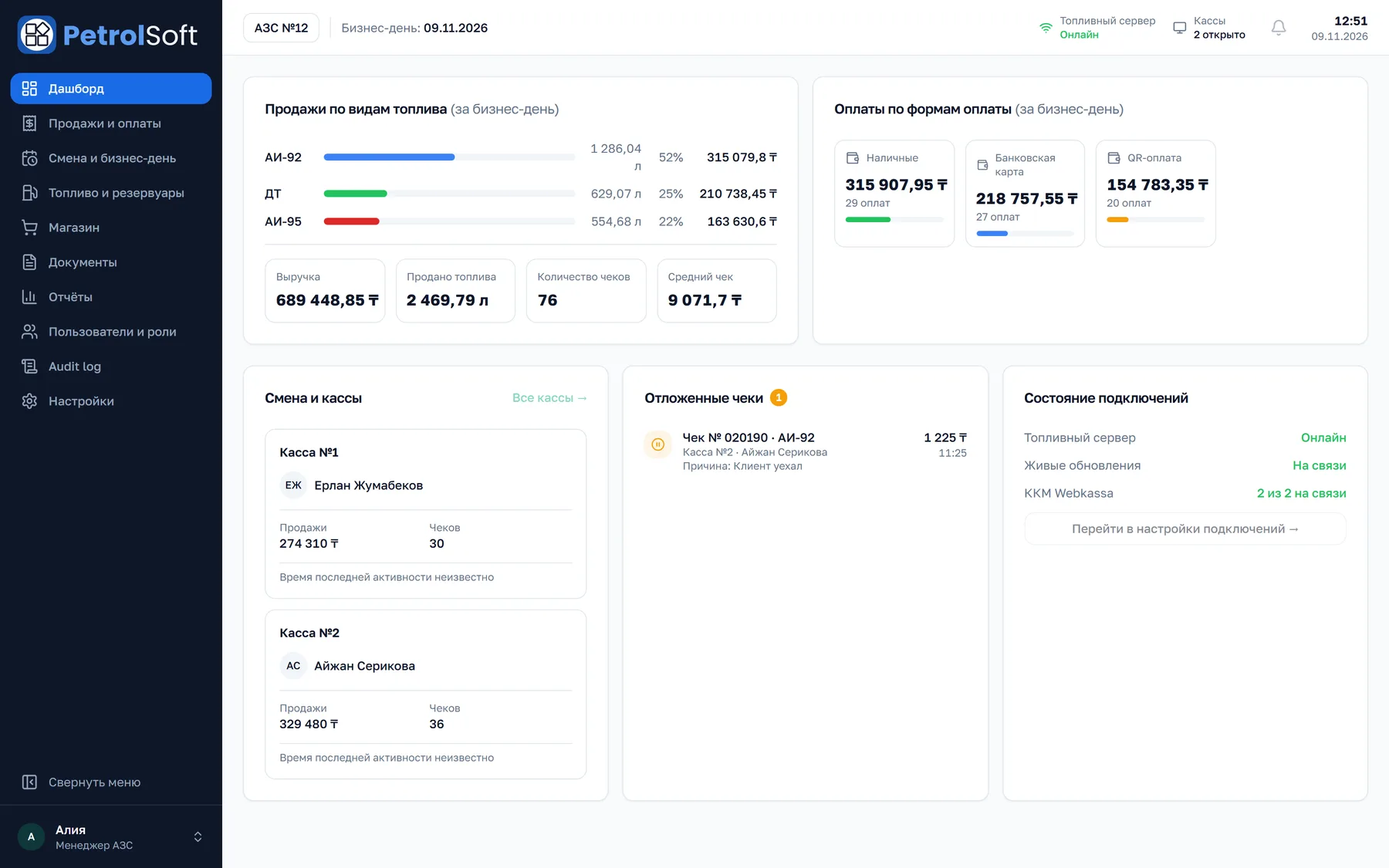
PetrolBOS dashboard: sales by fuel grade, payments by method, shift and registers, deferred receipts and connection status

PetrolBOS dashboard: sales by fuel grade, payments, shift and registers, deferred receipts and connection status. Demo data.

01Station challenges

Every operation at the station should be under control.

Questions owners and managers ask every day, and where in the system the answer lives.

  1. 01

    Sales and revenue

    How much was sold this shift, through which register and with which payment method?

    PetrolBOS · Sales & payments

  2. 02

    Equipment and fuel dispensing

    Which pump is free, where is fuelling in progress, when did a transaction finish?

    PetrolPOS · Pump panel

  3. 03

    Fuel stock

    How much fuel is actually in the tank, and how much should be there on the books?

    PetrolBOS · Fuel & tanks

  4. 04

    Cashiers and cash

    Who worked the register, what cash was paid in and collected, did the shift balance?

    PetrolPOS · Shift & cash operations

  5. 05

    Fuel deliveries

    Does the delivered volume match the waybill, and what did the tank show after unloading?

    PetrolBOS · Fuel receipt

  6. 06

    Unstable connectivity

    Which component lost its connection, and what happens to receipts already issued?

    PetrolPOS · Connection status

  7. 07

    Station network

    Which station’s sales are down, when is the peak load, and can these numbers be trusted?

    PetrolCDB · Network analytics

02Ecosystem

Three workstations. One data loop.

Cashier workstation

PetrolPOS

A touchscreen POS where the cashier sees every pump at the station and runs a sale from pump selection to receipt.

  • Pump panel with the status of every dispenser
  • Sale by volume, by amount or “Full tank”
  • Payment by cash, card, QR or a mix
  • Shifts, cash in, transfer to safe and collection
  • Sales journal, receipts and deferred sales
  • Tank levels right on the register
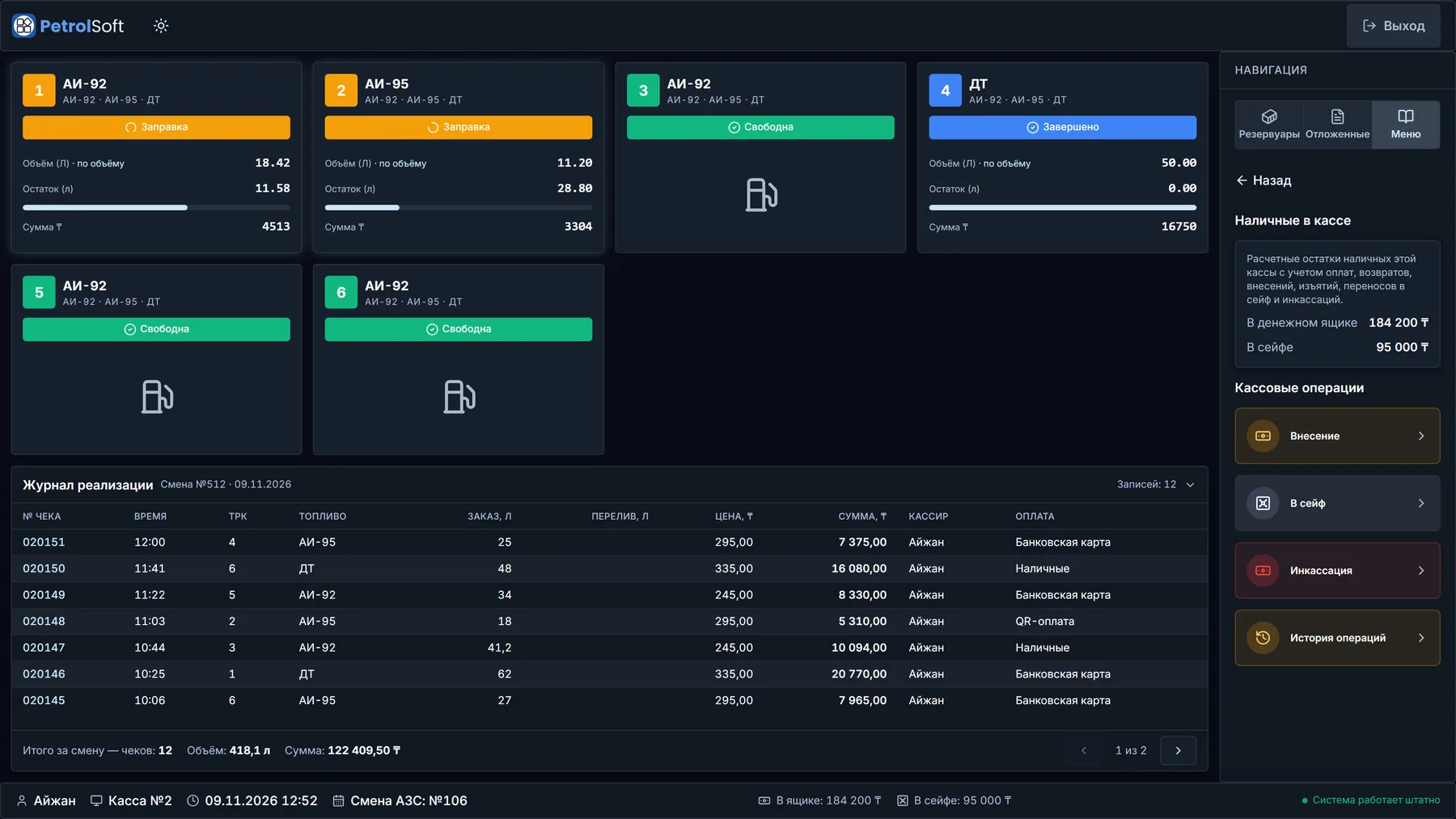
PetrolPOS
Fuel sale
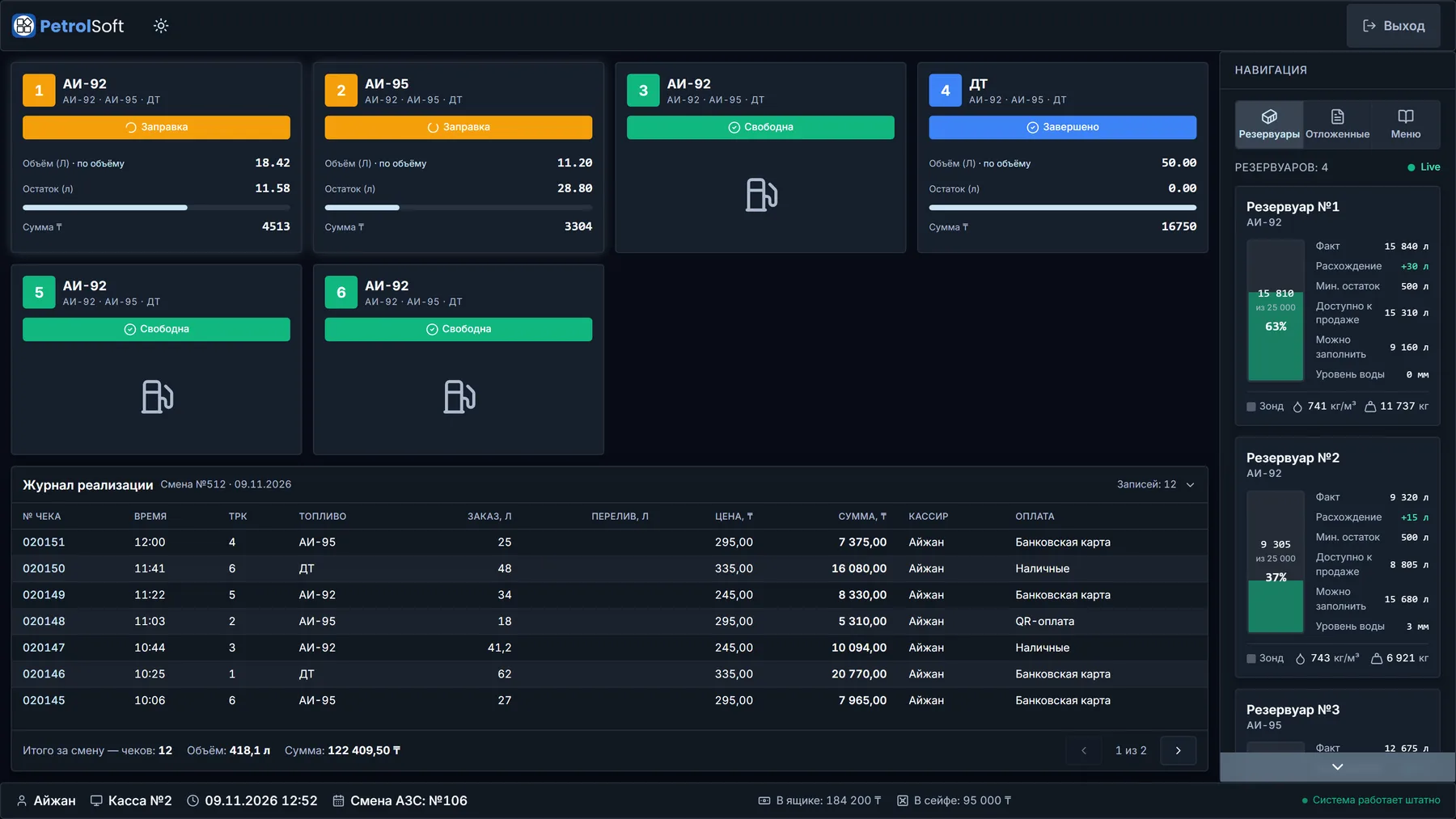
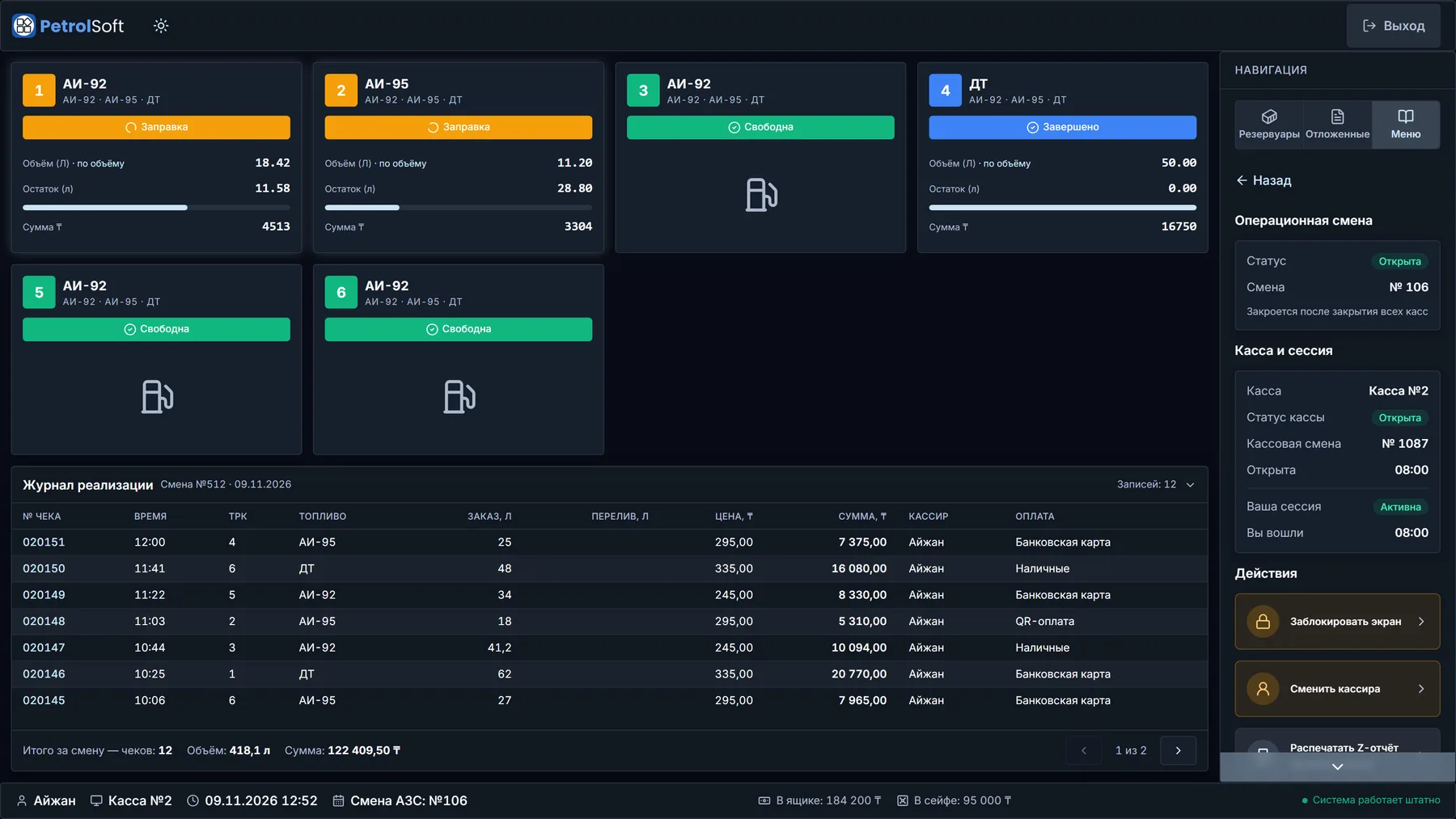
PetrolPOS main screen: six pumps, two fuelling and one finished, tanks with actual stock and variance on the right, the sales journal and “System running normally” at the bottom

Manager workstation

PetrolBOS

The station back office: sales and payments, shifts and registers, tanks and delivery documents, equipment and price settings.

  • Dashboard for the current business day and connection status
  • Sales and payments by register, cashier and fuel
  • Station shifts, fiscal shifts and cashier sessions
  • Tanks and fuel delivery documents
  • Users, roles and an activity log
  • Settings for pumps, registers, fiscal devices, fuel and prices
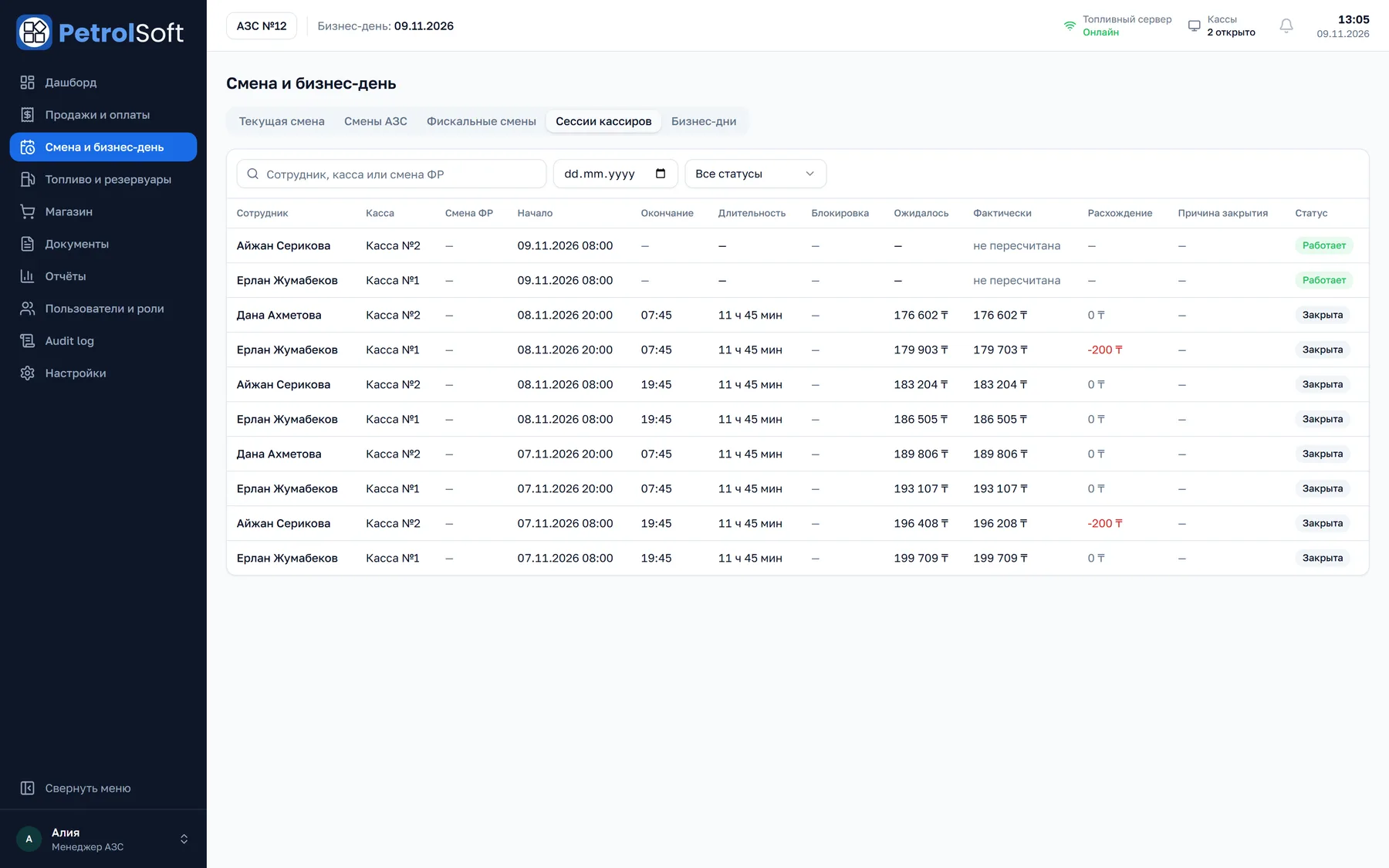
PetrolBOS
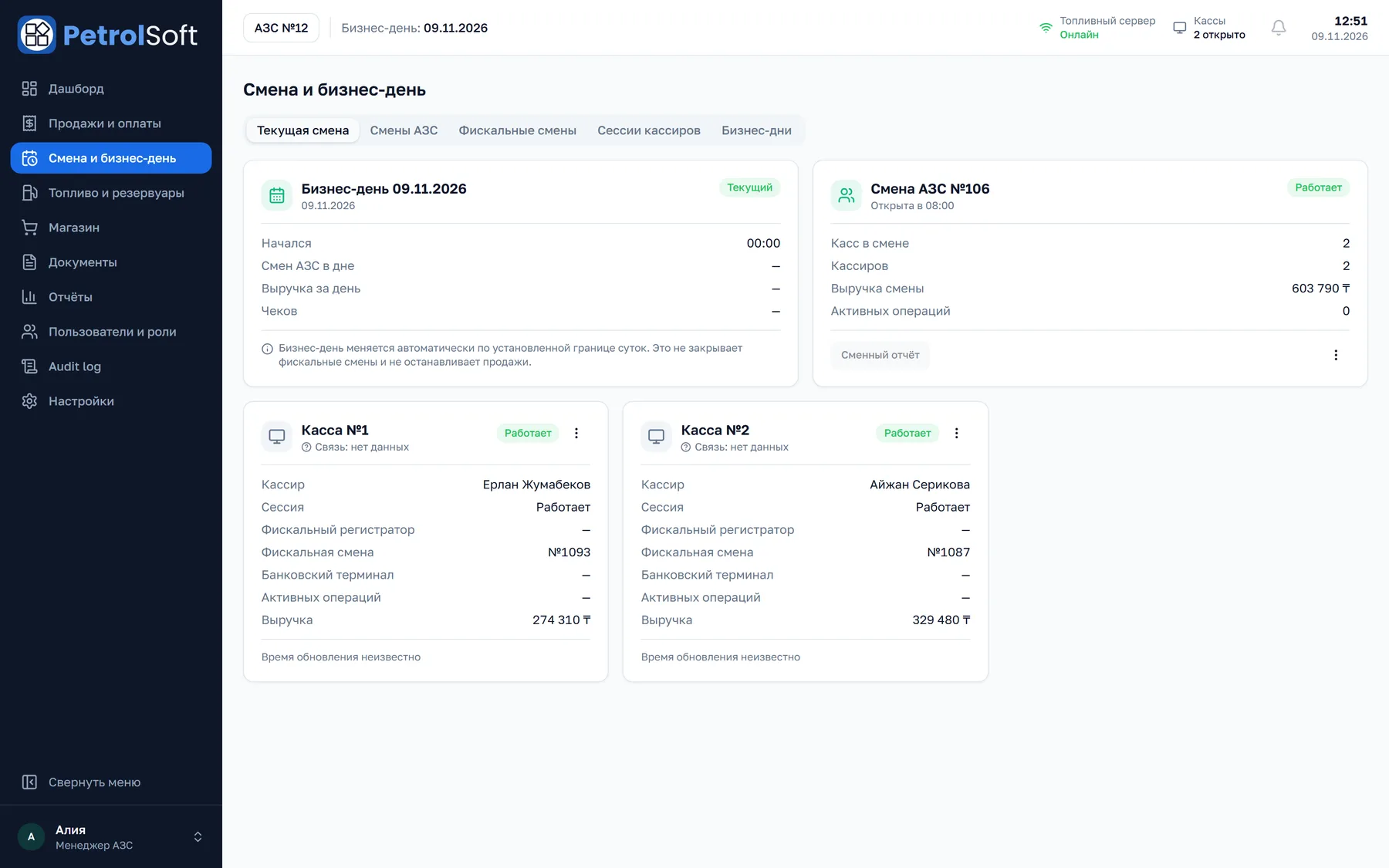
Shift & business day
PetrolBOS “Shift & business day”: the business day, station shift No. 106, and two registers with cashiers, fiscal shifts and revenue

Central office workstation

PetrolCDB

A central service that collects data from every station: sales, peak hours, sales pace, technical spills and goods in one set of analytics.

  • Sales overview by station, fuel and payment basis
  • Peak hours and a load map for shift planning
  • Sales pace: the last 7 days against the previous 7
  • Technical spills kept apart from commercial sales
  • Goods sales and control: returns, discounts, reconciliation
  • Data quality: coverage and completeness for every station
PetrolCDB
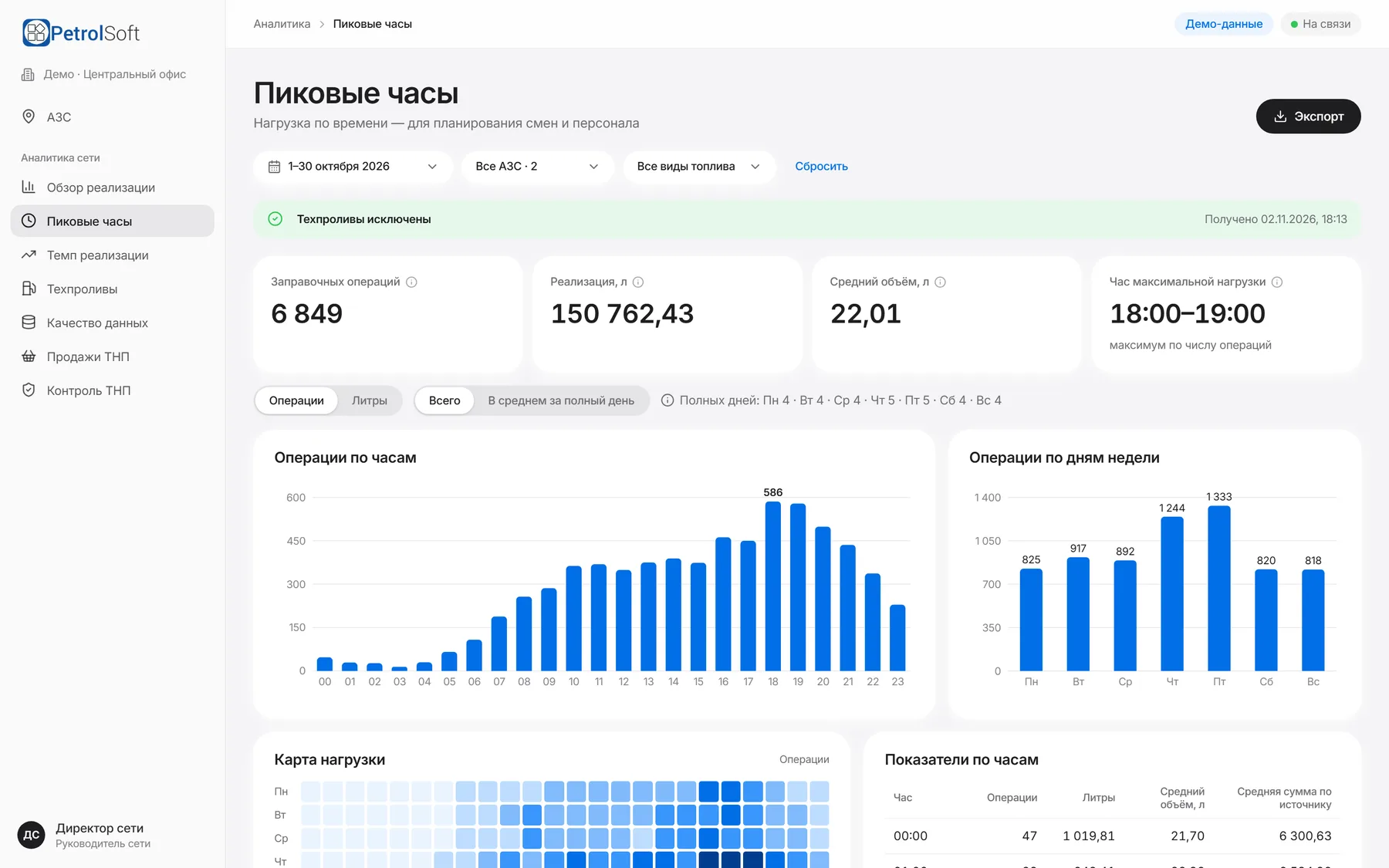
Peak hours
PetrolCDB peak hours: operations by hour and weekday, the busiest hour and a load map
03How PetrolPOS works

Fuel sales under control at every step.

One scenario, from choosing a pump to the receipt. The POS shows every step explicitly, so the cashier never has to guess what is happening at the pump.

Step 1 of 6

Choose a pump and fuel

Every pump on one screen: number, fuel grades and status. Choosing a free pump opens an active sale.

PetrolPOS
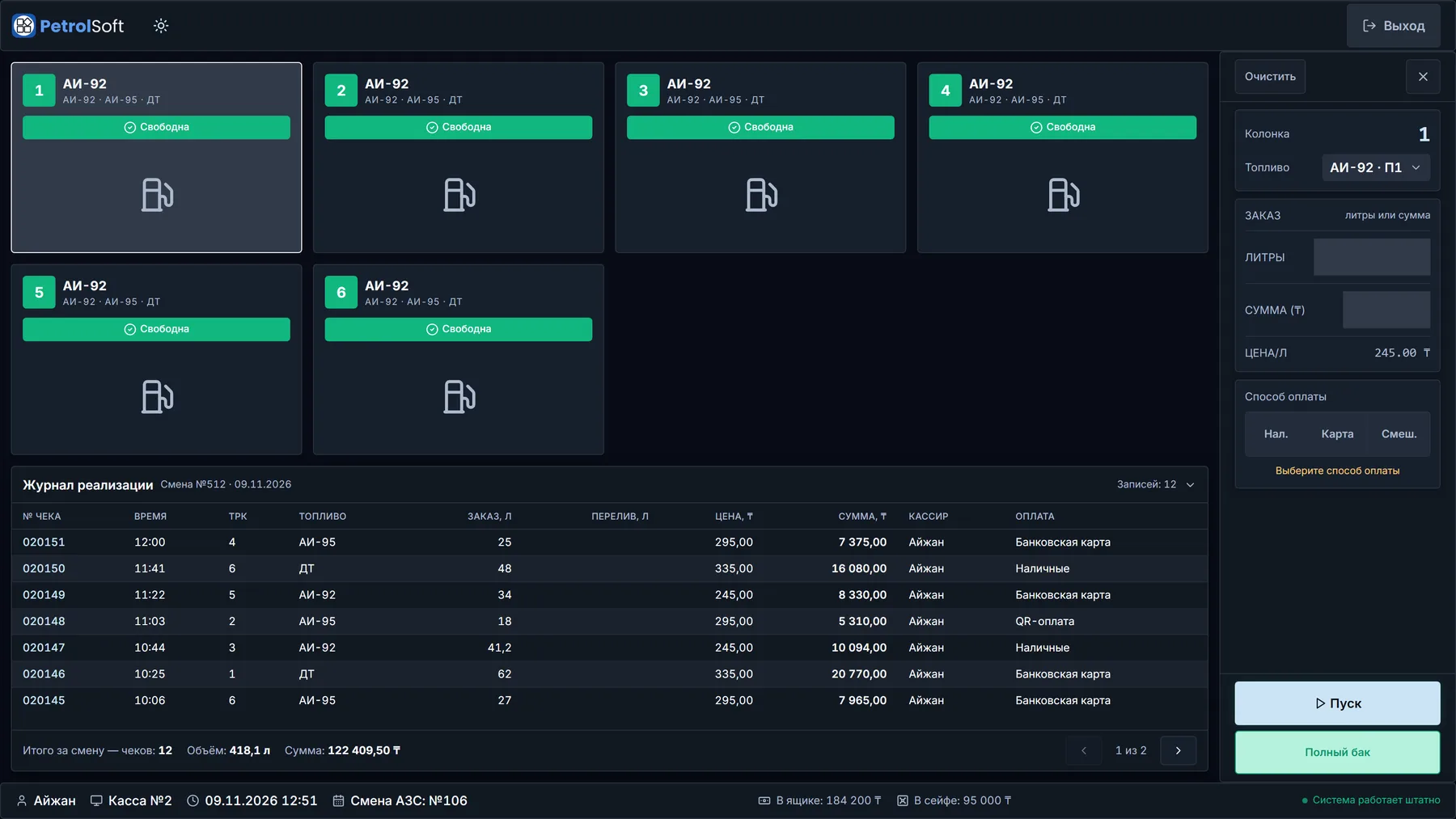
Choosing a pump
PetrolPOS with pump 1 selected: the order panel on the right with AI-92 fuel, litres and amount fields and payment methods, the sales journal below
04PetrolBOS

Station data that decisions are based on.

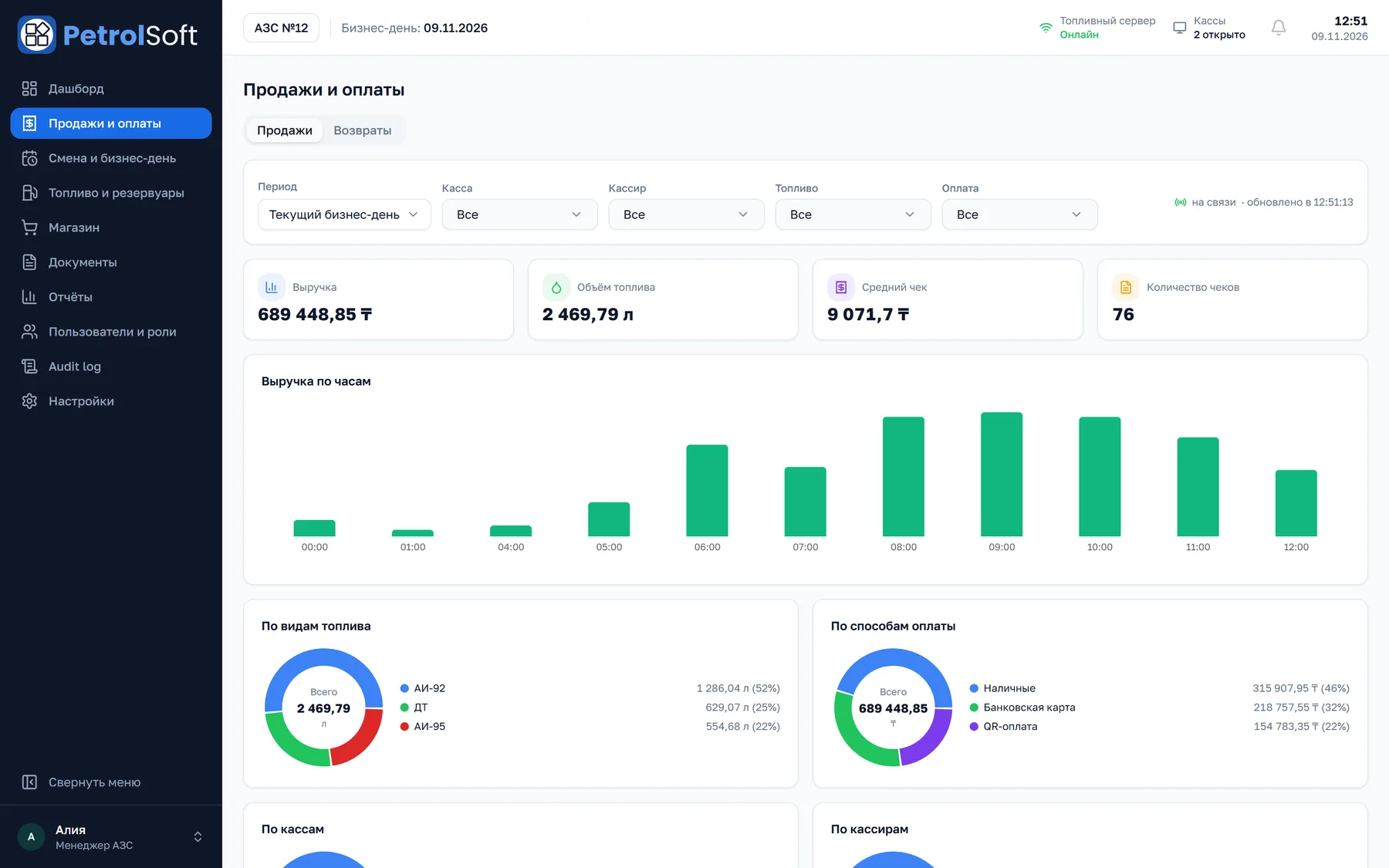
The “Sales & payments” section gathers revenue and volumes for the selected period and breaks them down by hour, register, cashier, fuel grade and payment method.

PetrolBOS
Sales & payments
PetrolBOS “Sales & payments”: filters, revenue, fuel volume, average ticket, receipt count, revenue by hour, and the mix by fuel grade and payment method12345
1Filters: period, register, cashier, fuel, payment2Revenue, volume, average ticket and receipt count3Revenue by hour4Sales mix by fuel grade5Sales by payment method

01

What a manager sees

  • Revenue, fuel volume, average ticket and receipt count
  • Sales mix by fuel grade and payment method
  • Figures for every register and every cashier

02

What they can check

  • History of sales and refunds
  • Filters by period, register, cashier, fuel and payment method
  • Shift report exported to Excel

03

What they can decide

  • Which shift or register to look into
  • How to split purchasing across fuel grades
  • When to change prices: a new price is set with its start date
05Fuel accounting

Fuel under control from delivery to sale.

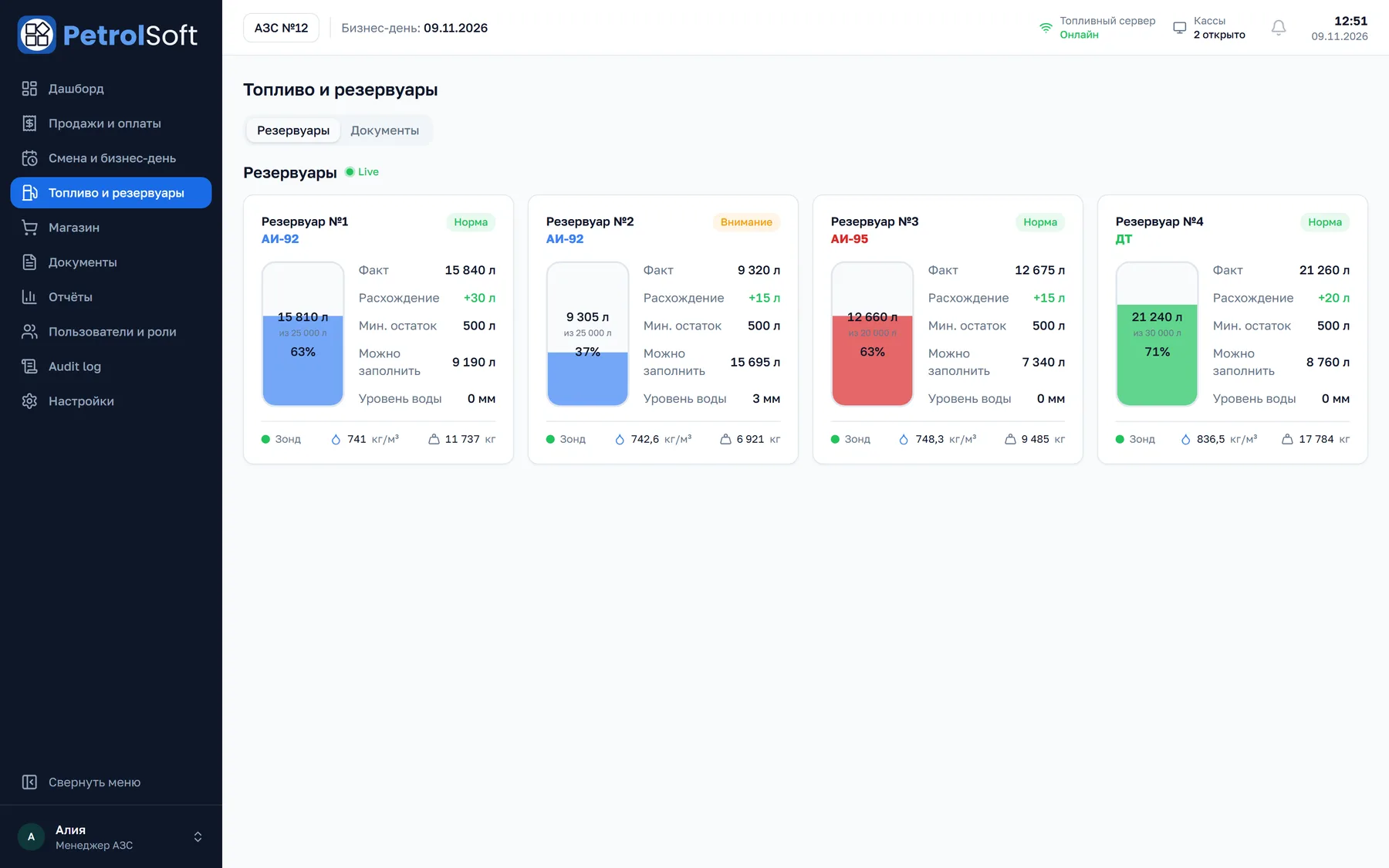
Tanks are visible in the back office and on the register. Deliveries are received step by step, with readings before and after unloading, and the system shows discrepancies right away.

PetrolBOS
Fuel & tanks
Four tanks in PetrolBOS: actual stock, variance, minimum level, how much can be filled, water level, probe status, density and mass12345
1Actual stock, variance against the books, minimum level2Fill level and the volume that can still be received3Water level4Probe status, density and mass5Tank status: “Attention” on deviations
Stock
Actual and book stock, the variance between them, minimum level.
Capacity
Fill percentage, “Can be filled”, available for sale.
Quality
Temperature, density, mass, water level and volume.
Measurements
Tank gauge probe status, last update time, alarms: leak, unauthorised filling, level deviation.

Fuel receipt

  1. 01

    Basic data

    Waybill, tanker truck, driver, volume and mass per waybill, quality certificate and samples.

  2. 02

    Reading before unloading

    From the tank gauge or entered manually with a reason.

  3. 03

    Unloading

    Fuel dispensed through the pumps during unloading is accounted for.

  4. 04

    Reading after unloading

    The volume actually received is recorded.

  5. 05

    Check

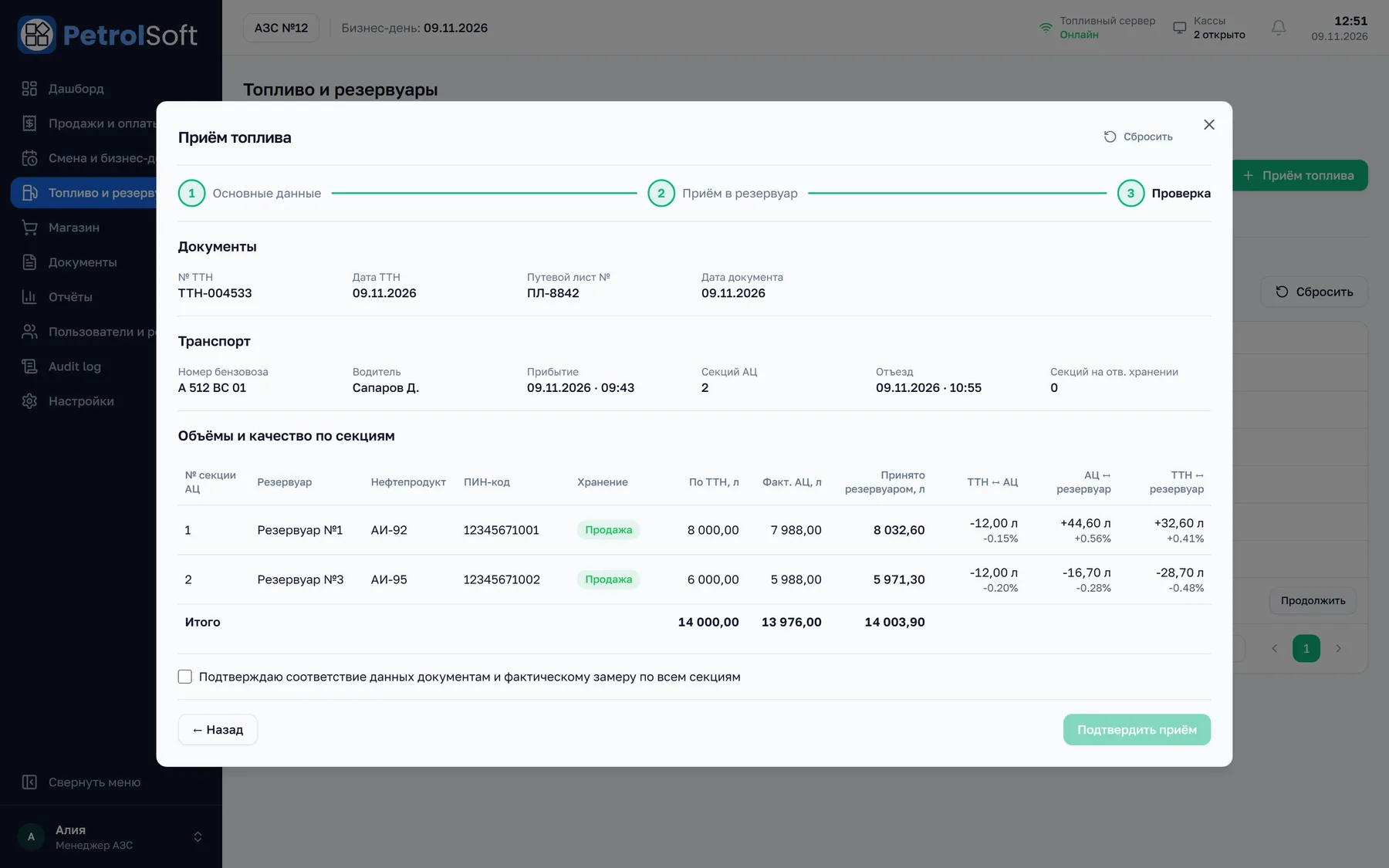
    Waybill, tanker and tank are reconciled. Discrepancies above 1% are highlighted.

  6. 06

    Confirmation

    A receipt document exported to PDF, Excel and Word.

PetrolBOS
Fuel receipt · Check
PetrolBOS “Fuel receipt” wizard, “Check” step: documents, transport, volumes by compartment and reconciliation of waybill, tanker and tank
PetrolBOS
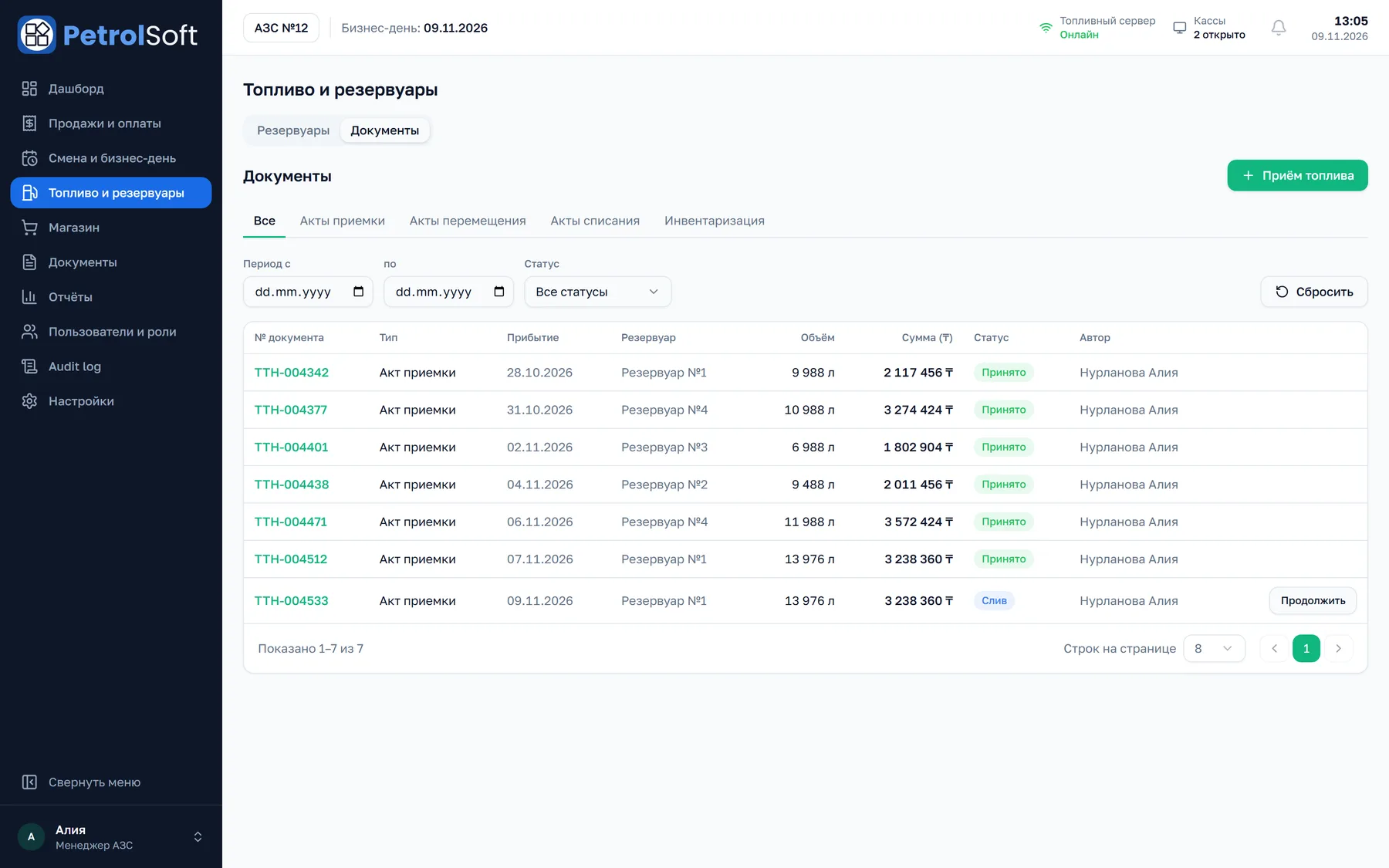
Fuel & tanks · Documents
PetrolBOS document register: fuel receipt acts with waybill number, arrival date, tank, volume, amount, status and author
06Shifts and cash

Clear operations records. Transparent accountability.

Every cash operation is tied to a shift, a register and a cashier, so you can see what was done, when and at which workstation.

Station operating shift
  1. 01

    Register shift
    Opened on a specific register. X-report at any time during the shift.
  2. 02

    Cashier session
    Each cashier has their own session. Change cashier and hand over the register without closing the shift.
  3. 03

    Cash operations
    Cash in, transfer to safe, collection to the office or bank.
  4. 04

    Closing and reconciliation
    Z-report when the register closes, shift report, pump totaliser and tank readings.
PetrolPOS
Shift
PetrolPOS “Shift” screen: station shift No. 106, register No. 2, the register shift and cashier session, with lock screen and change cashier buttons
PetrolPOS
Cash operations
PetrolPOS cash panel: 184,200 tenge in the cash drawer, 95,000 tenge in the safe, and buttons for cash in, transfer to safe, collection and operation history
PetrolBOS
Cashier sessions
PetrolBOS cashier session log: employee, register, start and end, expected and actual amount, variance and status
07PetrolCDB

The whole station network on one central office screen.

PetrolCDB shows management sales, load, technical spills and goods across all gas and LPG stations. Next to the numbers you can see how complete the data is, so decisions do not rest on a partial export.

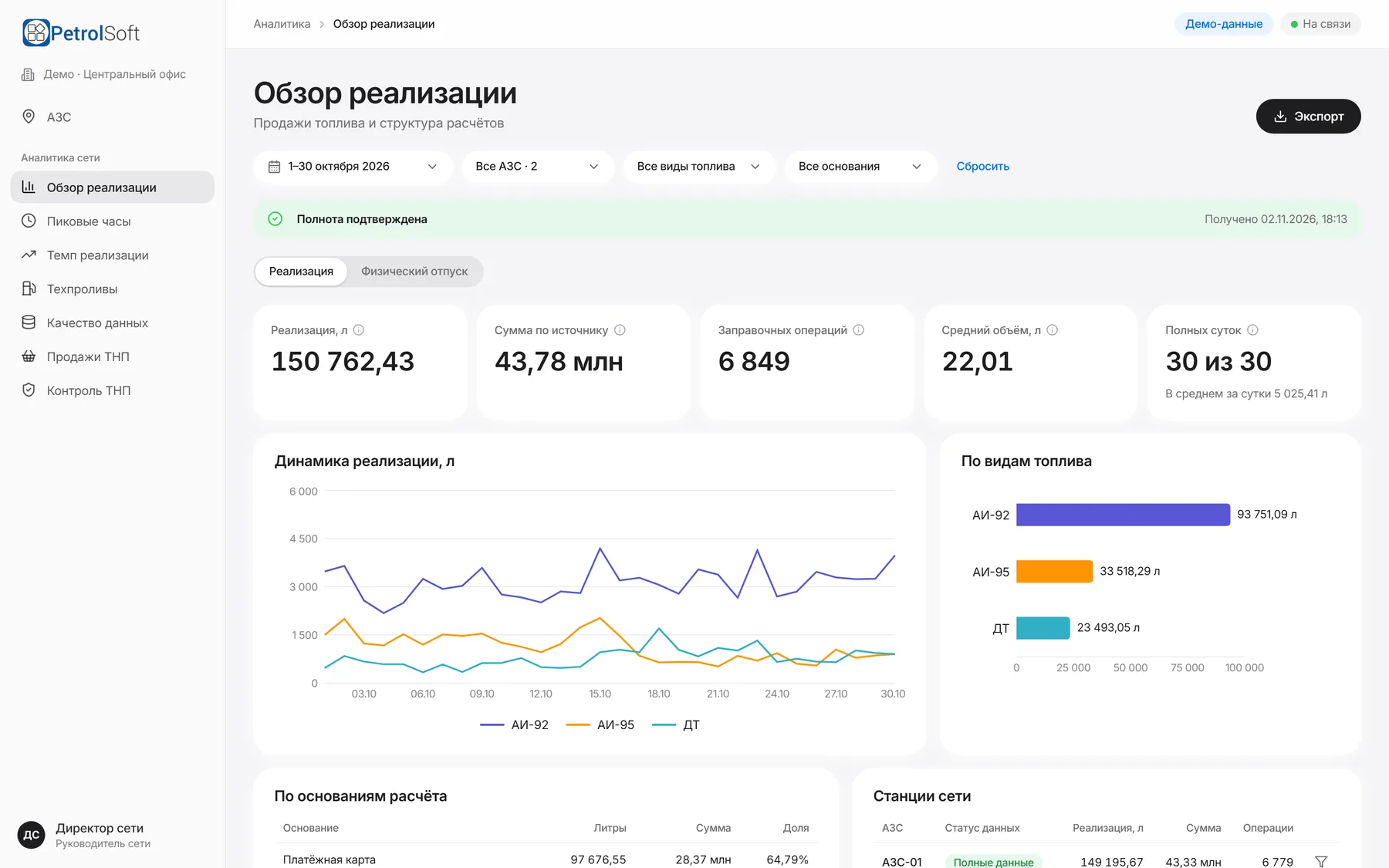
PetrolCDB
Sales overview
PetrolCDB sales overview: filters, sales in litres, amount, operations, average volume, complete days, daily dynamics and the mix by fuel grade12345
1Filters: period, station, fuel, payment basis2Data completeness status for the selected period3Sales, amount, operations and average volume4Sales dynamics by day and fuel grade5Sales mix by fuel grade

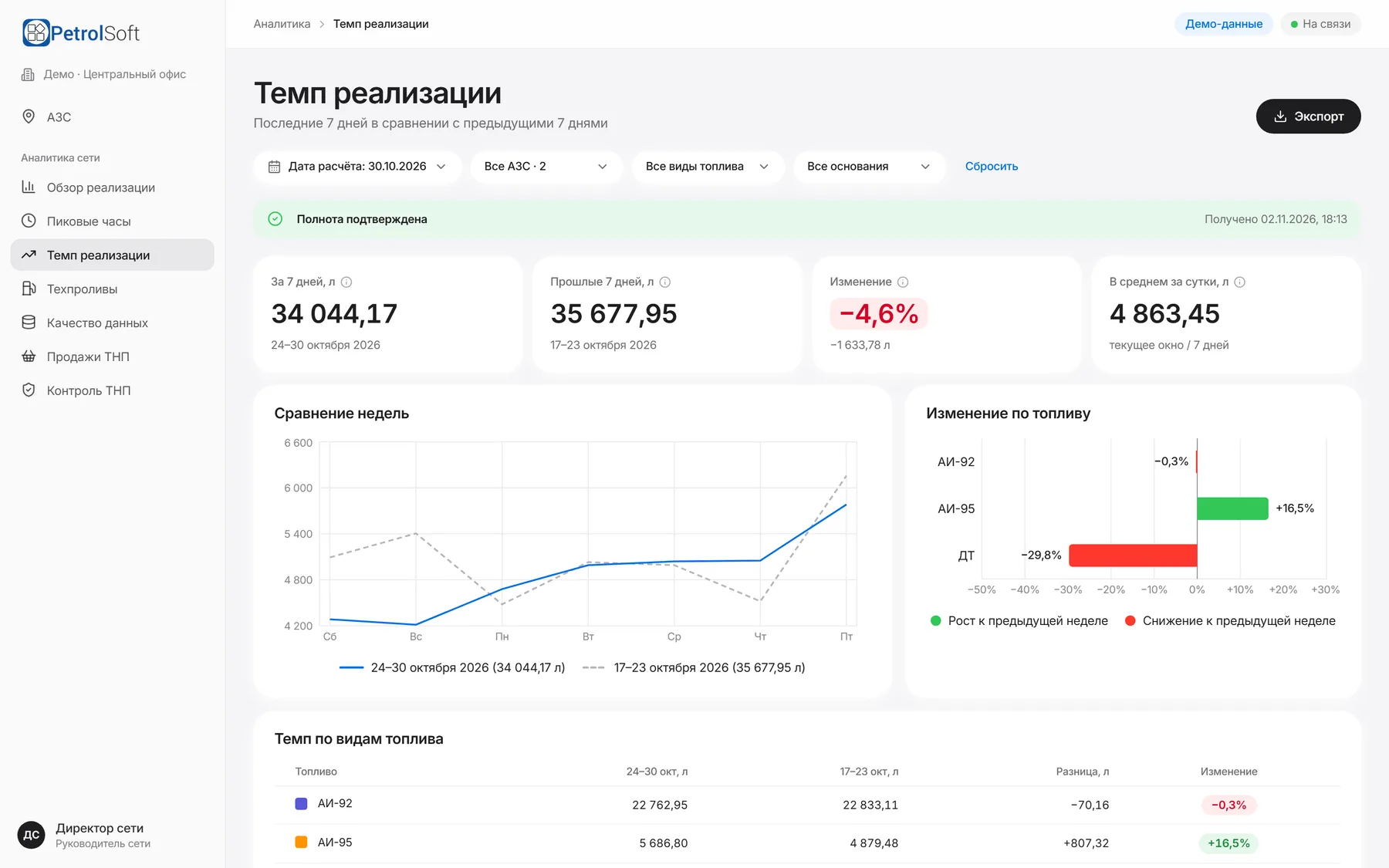
The last 7 days against the previous 7: by network, station and fuel grade. A drop shows up right away.

PetrolCDB
Sales pace
PetrolCDB sales pace: the last 7 days against the previous 7, percentage change, a week comparison and change by fuel grade
08Architecture and reliability

Software built for how gas stations really work.

Equipment, the fuel server and workstations run inside the station. External services connect through queues, so a temporary outage does not lose data.

Every gas and LPG station · station local network

Dispensers

via controllers

Tank gauges

on every tank

drivers

Fuel server

controls fuelling, polls the tanks

REST · WebSocket

Accounting server

sales, shifts, documents

real time

PetrolPOS

cashier registers

PetrolBOS

manager back office

station data

External services

Webkassa

fiscal receipts, retry queue

KGD

tank readings and deliveries, resent on failure

Banks and processing

in development

Central office · gas and LPG station network

PetrolCDB

network-wide analytics

Stations send their data to the central PetrolCDB service, which turns it into analytics for management: for each station and for the network as a whole.

Connection status

The POS constantly shows its link to pumps, tanks and the back office: “System running normally”, or exactly which component is unreachable.

On-site infrastructure

The fuel server is installed at the station. It controls the pumps, polls the tanks and passes data to the POS and back office in real time.

When the external link drops

If Webkassa is unavailable, the receipt is stored and resent. KGD transfers queue up and are delivered later. Fuelling requires the POS to reach the station servers.

Recovery

Once the connection is back, the fiscal and transfer queues deliver the data on their own. The cashier can also resend a receipt manually.

For IT teams: PostgreSQL on the station servers, REST and WebSocket between components; data change events reach workstations without a page reload.

09Who it is for

Software for everyday operations and fuel business growth.

01

Single gas / LPG station

The POS, fuel accounting and back office share one data set. Webkassa fiscalisation and data transfer to KGD are built in.

02

Gas / LPG station network

Each station runs in its own loop, and PetrolCDB brings their data into shared analytics for the central office: sales, peak hours, technical spills and goods.

Managing stations from the office is in development
03

Station owners and managers

Sales, shifts, tanks and deliveries in one back office. Access is split by role: station manager, cashier, mini-market manager.

04

Fuel company IT teams

On-site installation, connection diagnostics on the POS, set-up of pumps, registers, fiscal devices and terminals through back office directories.

10Partners

PetrolSoft partners across Kazakhstan.

From Oral in the west to Oskemen in the east, PetrolSoft partners work in every region of the country. Our head office is in Astana.

Map of Kazakhstan: head office in Astana, partners in: Almaty, Shymkent, Karaganda, Aktobe, Taraz, Pavlodar, Oskemen, Semey, Atyrau, Kostanay, Kyzylorda, Oral, Petropavl, Aktau, Taldykorgan, Turkestan, Kokshetau, Zhezkazgan, KonaevAstana
  • Astana · head office
  • Almaty
  • Shymkent
  • Karaganda
  • Aktobe
  • Taraz
  • Pavlodar
  • Oskemen
  • Semey
  • Atyrau
  • Kostanay
  • Kyzylorda
  • Oral
  • Petropavl
  • Aktau
  • Taldykorgan
  • Turkestan
  • Kokshetau
  • Zhezkazgan
  • Konaev
11Implementation

From the first demo to go-live at your station.

This plan is preliminary. Timelines depend on the station equipment and the agreed scope of work.

  1. Stage 1. Demo

    We show PetrolPOS, PetrolBOS and PetrolCDB on your station’s scenarios.

  2. Stage 2. Site survey

    Pumps and controllers, tank gauges, registers and fiscal devices, shift and delivery procedures.

  3. Stage 3. Configuration

    We agree on workstations, equipment and the Webkassa connection.

  4. Stage 4. Set-up and testing

    Directories, fuel and prices, test fuelling on your pumps.

  5. Stage 5. Training

    Cashiers and managers work in the system before go-live.

  6. Stage 6. Go-live and support

    Launch and support via our hotline.

Support 24/7
Our support line works around the clock, including night shifts and public holidays. Calls are answered by the team that builds PetrolPOS and PetrolBOS.
12FAQ

What people ask before a demo.

12Demo

See PetrolSoft at work.

We will walk you through the interfaces, look at your station’s needs and discuss the right configuration.

Required fields